
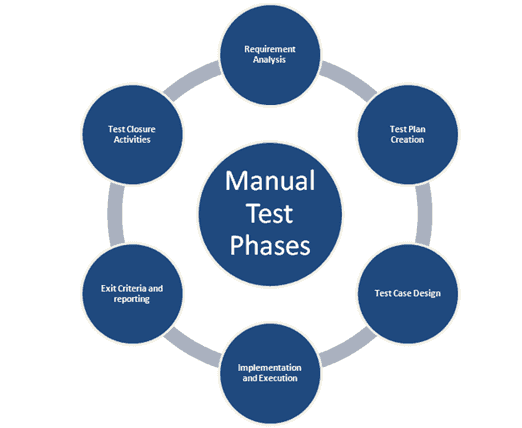
Manual testing is still vital in software development, supporting automated testing endeavours to guarantee software products’ dependability and quality. Software developers and testers rely heavily on manual testing tools, which support them in every step of the testing process.
This article will explore the wide range of manual testing technologies that software engineers might use.
These solutions provide features designed to improve communication, improve manual testing procedures, and enable effective bug tracking and resolution, ranging from test management and bug tracking to exploratory testing and collaboration.
By understanding the different types of manual testing tools and their respective purposes, software developers can make informed decisions in selecting the right tools to augment their testing efforts, ultimately contributing to the delivery of high-quality software products that meet user expectations and industry standards.
Importance of manual testing in software development.
While automated testing plays a crucial role in software development, manual testing remains essential for several key reasons:
1. Identifying UI/UX Issues:
- Human testers can intuitively identify usability problems like unclear language, confusing layouts, or clunky interactions that automated tools might miss.
- They can assess the overall user experience from a subjective perspective, ensuring the application is enjoyable and intuitive.
2. Exploring Edge Cases and Complex Scenarios:
- Manual testing allows for the creative exploration of unusual user behaviours and unexpected situations that might be difficult to automate.
- Testers can think outside the box, uncovering potential issues that automated scripts might not be able to handle.
3. Verifying Performance and Compatibility:
- While automated tools can measure performance metrics, manual testing allows for subjective evaluation of responsiveness, smoothness, and overall user perception of performance.
- Additionally, manual testing can assess compatibility across different hardware, browsers, and devices, ensuring a seamless experience for diverse users.
4. Testing Non-Functional Aspects:
- Attributes like security, data privacy, and accessibility are not easily measured by automation.
- Manual testing allows for a thorough exploration of these aspects, ensuring the software meets specific requirements and regulations.
5. Providing Context and Insights:
- Human testers can interpret results, provide valuable insights beyond just passing or failing tests, and suggest improvements to the development process.
- Their understanding of user behaviour and needs adds an important layer of context to automated test findings.
Limitations Of Manual Testing and the role of tools in enhancing
Manual testing tools play an important role in software development, offering unique advantages like user experience evaluation and edge case exploration.
However, it also needs to improve its efficiency and effectiveness. This is where tools step in, enhancing manual testing in key ways:
Limitations of Manual Testing
- Time-consuming: Manually checking everything across platforms and devices can be slow, hindering release cycles and agility.
- Prone to Error: Subjectivity, fatigue, and inconsistency can lead to missed bugs and unreliable results.
- Limited Scalability: Complex applications with numerous pages or variations quickly become impractical to test manually.
- Difficult Cross-Platform Coverage: Testing across every platform and device is often infeasible, leaving compatibility issues undetected.
- Limited Repeatability: Manual processes are hard to replicate exactly, reducing consistency and trend analysis.
- High Cost: The time and resources required for manual testing can significantly increase development costs.
How Tools Enhance Manual Testing:
- Increased Efficiency: Automation tools execute tests faster and more frequently, improving feedback loops and release cycles.
- Reduced Human Error: Tools eliminate subjectivity and ensure consistent, objective results across tests.
- Improved Scalability: Tools handle large applications and frequent testing cycles effortlessly.
- Enhanced Cross-Platform Coverage: Tools test across various platforms and devices, ensuring wider compatibility.
- Increased Repeatability: Automated tests ensure consistent execution and enable reliable trend analysis.
- Lower Cost: Automating repetitive tasks frees up resources and reduces overall testing costs.
Types of Manual Testing Tools:
Here’s a breakdown of some key categories of manual testing tools:
1. Test Management Tools:
- Focus: Organize test cases, track progress, generate reports, and integrate with other tools.
- Benefits: Improve collaboration, increase visibility, and enhance traceability.
- Examples: Jira, TestRail, TestLink, Zephyr.
2. Bug Tracking Tools:
- Focus: Report, track, assign, and manage bugs identified during testing.
- Benefits: Facilitate bug fix process, prioritize issues, improve communication.
- Examples: Jira, Bugzilla, Mantis, Asana.
3. Test Automation Frameworks (for manual test creation):
- Focus: Create reusable test scripts, facilitate data-driven testing, and manage test environments.
- Benefits: Improve test case standardization, increase reuse, and simplify manual execution.
- Examples: Selenium, Cypress, Katalon Studio, Robot Framework.
4. API Testing Tools:
- Focus: Send API requests, validate responses, and analyse performance.
- Benefits: Simplify API testing, improve accuracy, and increase test coverage.
- Examples: Postman, SoapUI, Paw, RestAssured.
5. Mobile Testing Tools:
- Focus: Test mobile apps on real devices or emulators, record screen sessions, and analyze performance.
- Benefits: Ensure app functionality on various devices, and identify mobile-specific issues.
- Examples: Appium, XCTest, Kobiton, MonkeyTalk.
6. Accessibility Testing Tools:
- Focus: Assist in testing compliance with accessibility guidelines for users with disabilities.
- Benefits: Ensure inclusive design, and improve user experience for all.
- Examples: WAVE, Accessibility Developer Tools, Achecker.
7. Collaboration Tools:
- Focus: Facilitate communication, document bugs, and issues, and share information among testers.
- Benefits: Enhance teamwork, improve communication, and streamline decision-making.
- Examples: Slack, Microsoft Teams, Google Meet, Confluence.
Remember: The ideal tool selection depends on your specific project needs, budget, team expertise, and the type of testing involved. Evaluate features, ease of use, and available support to find the perfect match for your testing goals.
Choosing the right tools
Choosing the right manual testing tool can be overwhelming with the vast array of options available. Here’s a guide to help you navigate the selection process:
1. Understand Your Needs:
- Project Scope: Analyze the size and complexity of your project. Is it a small web app or a large enterprise application?
- Testing Types: What types of testing do you need to perform? Functional, usability, accessibility, or mobile testing?
- Team Expertise: What is your team’s familiarity with manual testing tools? Do they require a beginner-friendly option or an advanced solution?
- Integration Requirements: Does the tool need to integrate with your existing development tools or project management software?
- Budget: What is your budget for a manual testing tool? Do you need a free open-source option or a paid commercial solution?
2. Evaluate Your Options:
- Research: Use online resources, reviews, and case studies to explore different tools within your chosen category.
- Compare Features: Compare features based on your needs, such as test case management, bug tracking, reporting capabilities, and platform support.
- Free Trials: Many tools offer free trials or demo versions. Utilize them to test the user interface, learning curve, and integration with your workflow.
- Community Support: Consider the size and activity of the user community around the tool. Active communities offer valuable resources and troubleshooting help.
3. Make an Informed Decision:
- Prioritize Needs: Don’t get overwhelmed by fancy features. Choose a tool that addresses your core testing needs most effectively.
- Consider Long-Term Value: While budget is crucial, consider the tool’s potential to grow with your project and team.
- User Experience: A user-friendly and intuitive interface can significantly improve team adoption and overall productivity.
- Support: Ensure the tool provides adequate support through documentation, tutorials, or a responsive community.
Additional Tips:
- Involve Your Team: Get tester feedback during the evaluation process to understand their preferences and ensure tool adoption.
- Start Small: If you’re new to manual testing tools, consider starting with a free open-source option to gain experience before investing in a paid solution.
- Stay Updated: The testing landscape evolves rapidly. Stay informed about new tools and updates to existing ones to continuously improve your testing process.
Conclusion
Choose the right manual testing tool that empowers your team, enhances efficiency, and ensures high-quality software throughout the development lifecycle.
By understanding the different types of manual testing tools and their respective purposes, software developers can make informed decisions in selecting the right tools to augment their testing efforts.